Handling Customer Calls and Bill Requests
Responding to guest service alerts and settling table bills from the notifications drawer and tables screen.
Steps
Receive notification alert
When a guest taps "Call Waiter" or "Request Bill", a notification chime sounds and the bell icon glows in the header.
A table requesting the bill will display a receipt icon on the floor plan; a table calling for assistance displays a hand wave icon.
Open the Calls drawer
Tap the bell icon or go to `/waiter/calls` to view the list of pending requests.
Requests are split into two groups: • Needs attention: Active calls and bill requests that have not been handled. • Responded: Requests that staff have acknowledged.
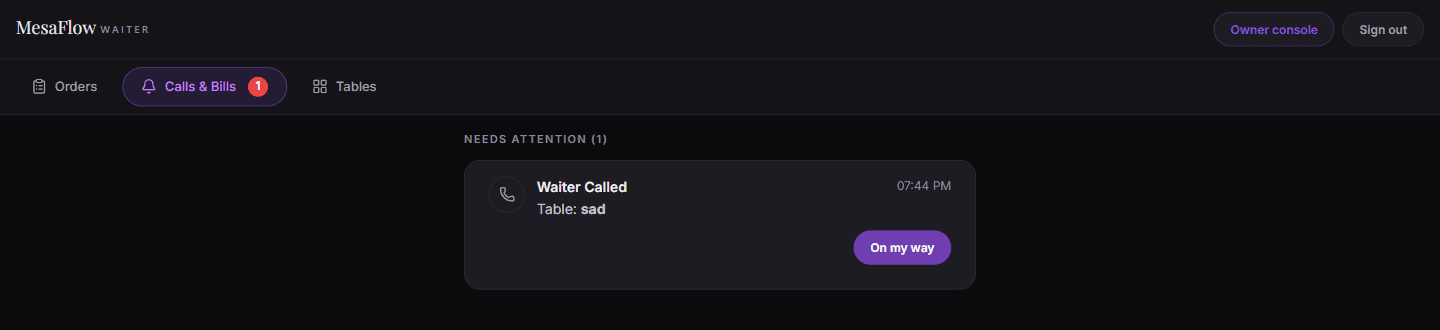
Waiter → Calls & Bills. The red badge counts requests that need attention. Process the bill payment
When presenting the check and collecting payment, tap the table bill card.
A confirmation dialog will appear: "Has this table paid?". Tap "Confirm Payment" to stamp the receipt as paid and close the table session.
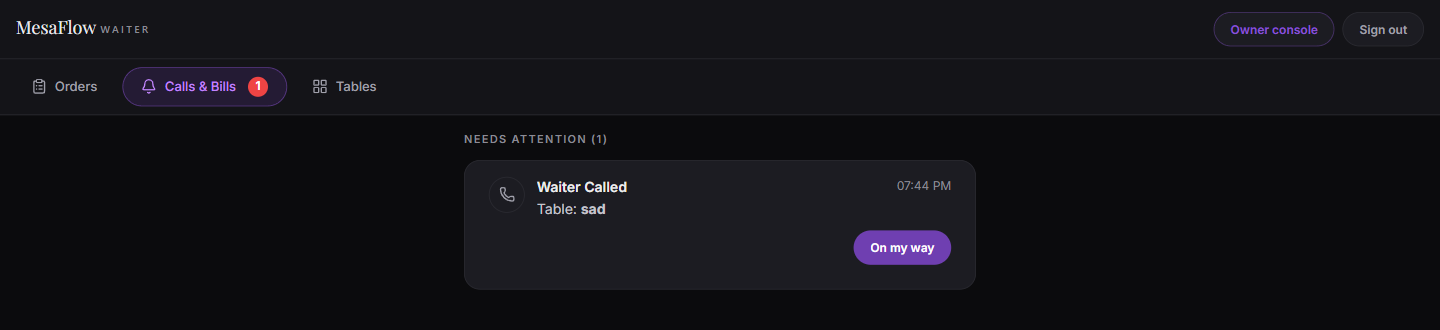
What you should see
Guest requests are promptly answered and table bills are finalized cleanly.
Good to know
- Closing the bill clears the active session on the guests’ phones and returns the table to ready status.
Related guides
- Logging In and Navigating the Waiter DashboardSigning in to MesaFlow, accessing the floor workspace at /waiter, and understanding the layout on phones and tablets.
- How to Place an Order on Behalf of a TableEntering an order for guests who prefer to order verbally or lack a mobile device.
- Managing Active Tables and Today’s ReservationsMonitoring table occupancy, viewing upcoming bookings, and managing table availability during shift.