How to Tap the Table NFC Card
How customers open the digital table menu by touching their phone to the table card without downloading any app.
Steps
Locate the table card
Find the MesaFlow table disc or stand on your dining table.
Each card is permanently fixed or set on the table with clear instructions indicating the tap zone.
Ensure phone NFC is ready
Unlock your phone screen and bring the device near the card.
On modern iPhones (iPhone XS and newer), NFC reading is always on. Hold the top edge of the iPhone within 2–3 cm of the card center. On Android, ensure NFC is enabled in quick settings and tap the center-back of the phone.
Tap the pop-up notification
A banner notification will appear on the phone screen with the restaurant’s menu link.
Tap the banner to launch the menu in Safari, Chrome, or your default browser. The table number is automatically identified.
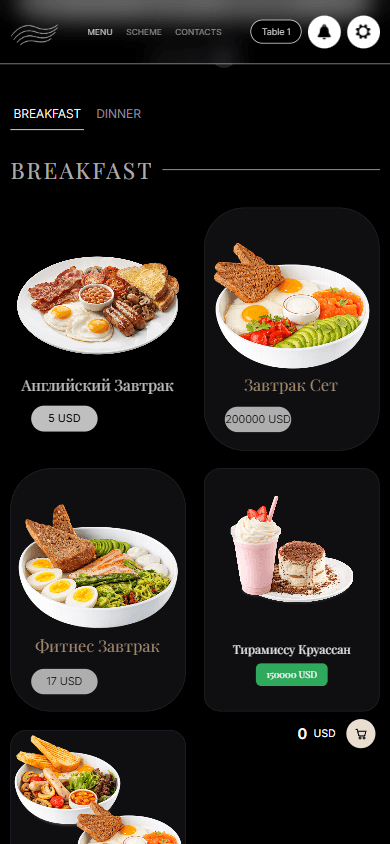
The table menu opens on the guest phone, with the table number at the top.
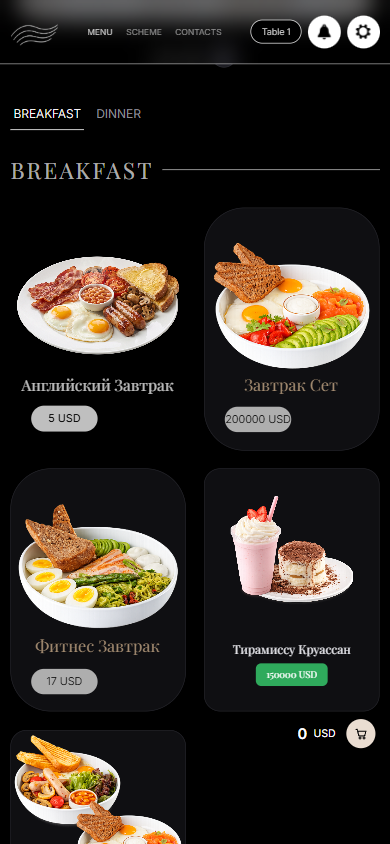
What you should see
The customer’s phone opens the restaurant’s live menu tied to their specific table.
Good to know
- No app install or user account is required.
- If the phone has a very thick metal or magnet case, the guest may need to touch the card directly or use the printed QR backup code.
Related guides
- How to Scan the Table QR BackupHow customers access the menu using their camera app if their phone does not support NFC.
- Browsing the Menu and Customizing DishesNavigating categories, dish options, combo substitutions, and ingredient preferences.
- Troubleshooting: Customer Cannot Open Menu or Tap Does Not WorkResolving issues where phone taps fail, notifications do not appear, or the menu displays an error.